- Will support you for ever, check Support method(Email us or Skype) from:
https://beseencontrol.com/Contact.html
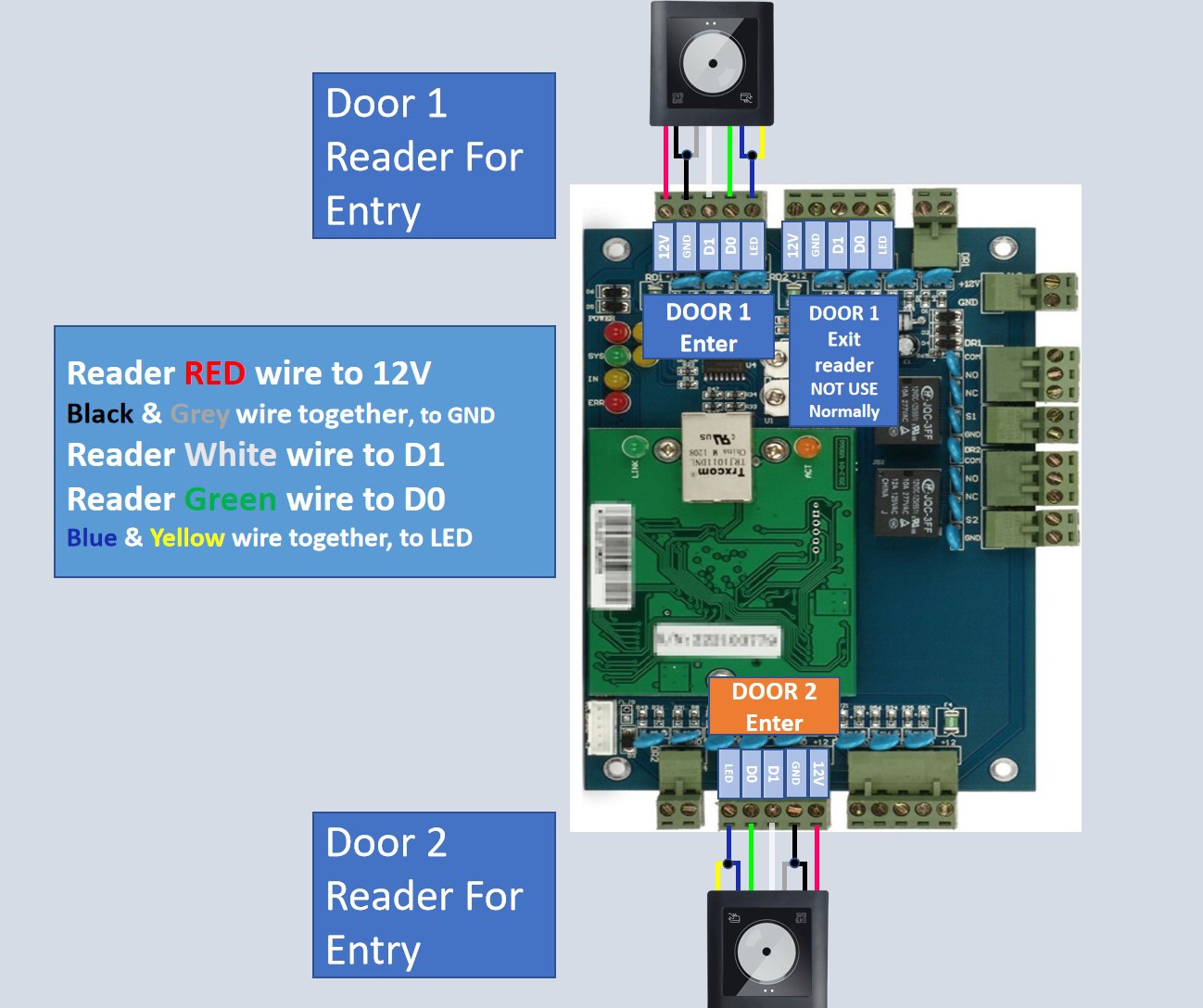
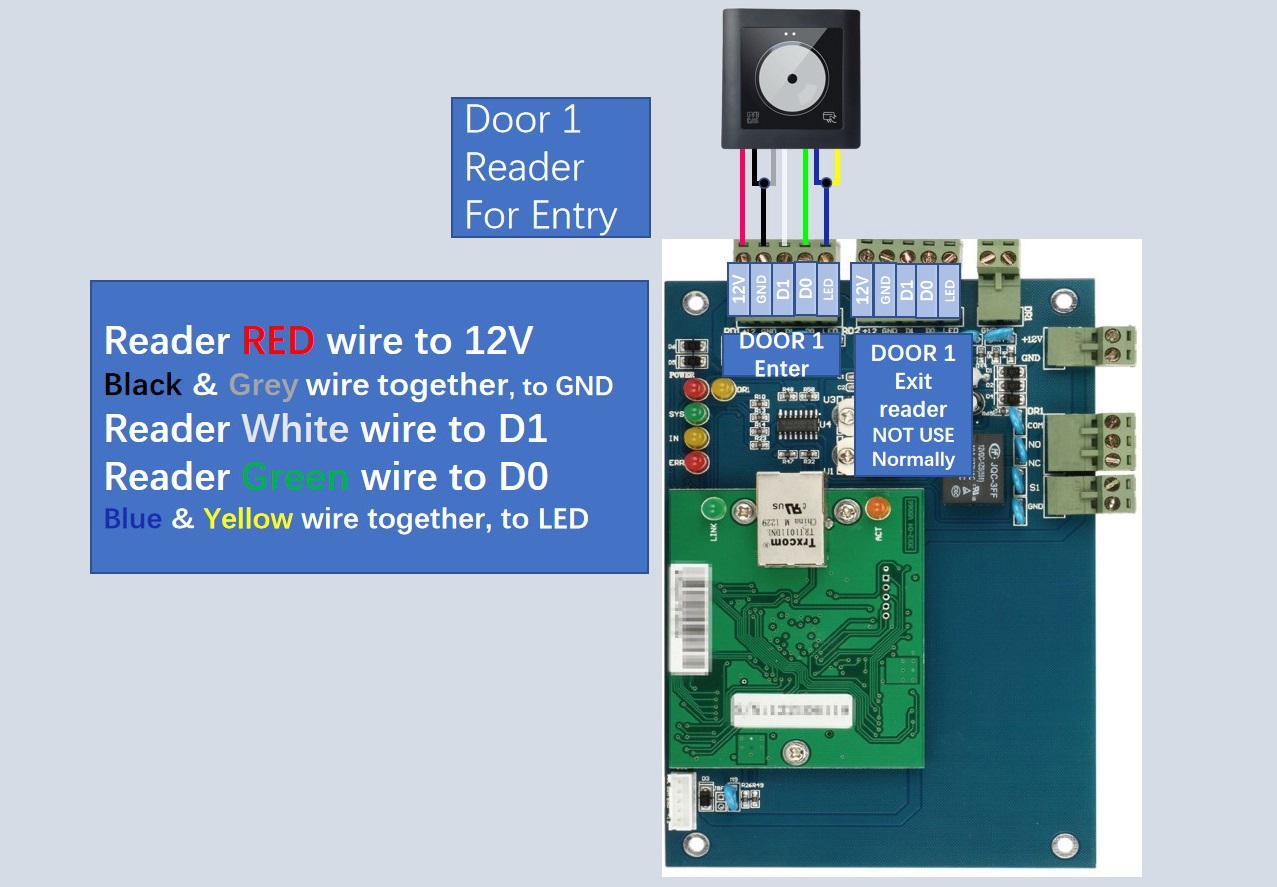
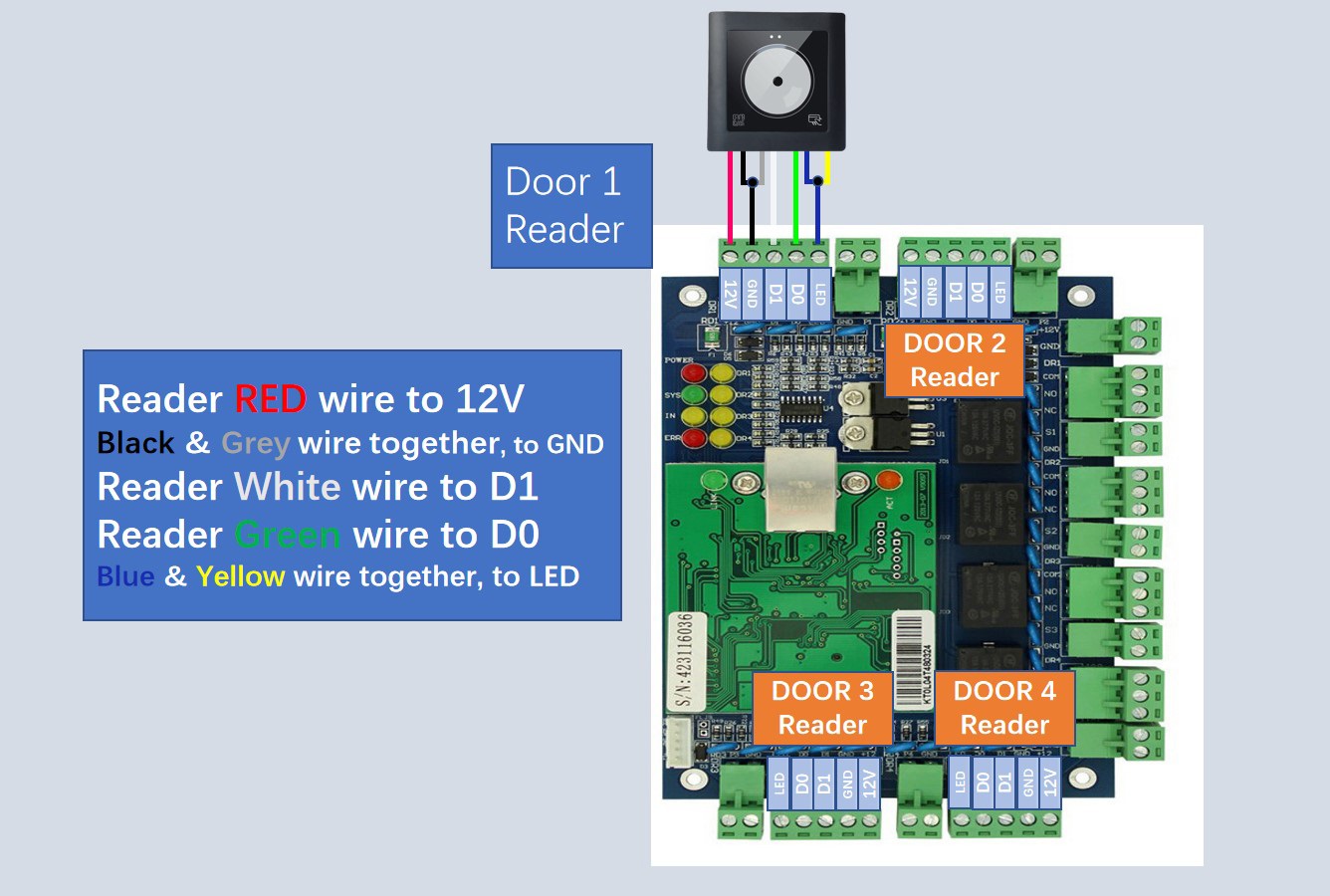
- For hardware wire, please follow our picture; For software side(below chapter 1), we can do all for you remotely by live support if you need help.
- If you need other installer to install for you and don't know how find them, can google search: 'locksmith near me'or search 'locksmith + your own city name'.
- If you have any questions or concerns, please refrain from returning our products directly, as we need to sell 4 or 5 kits to catch the loss back....
Suggestion: I'd suggest setting up the device on a table and make sure basic functions before installation, Begin and focus on one door firstly.
2.1 Video Of How to Power on Control Board: https://vimeo.com/668326343/a4d292ef8f
2.2 In Case Power box is not turned on, check this video: https://youtu.be/kT0q6J75p1o
2.3 Connect the Door Reader:
2.4. Connect the Magnetic lock:(If you need special bracket to install the mag lock, please contact us.)
2.5 Connect the Exit Button or Motion Sensor:
3.1 Software download from below link:
https://beseencontrol.com/AccessControl.en.zip
Kindly Note: The downloaded file is .zip compressed file, please right click mouse on it, extract All to a new folder firstly.
Software support: win7/win8/win10/win11 both 32 and 64 bit system, run the related setup file to install, Also, you can run N3000.exe directly without run setup file.
Password of software:
account: abc
password: 123
3.2 Software Quick video and Manual:
Video: https://vimeo.com/1114780633/1e22f7dc06
Manual: https://beseencontrol.com/QR-SoftwareManual.pdf
If you have USB Desktop reader, check this video: https://vimeo.com/717119097/4136517f853.3 Can also open door from software: https://vimeo.com/796308863/cfda22634c
3.4 Quick solve problem, follow: https://beseencontrol.com/Quick-Check-ForProblem.pdf
3.5. Phone app to open door: https://beseencontrol.com/phoneapp.html
3.6 Complete Manual from: https://beseencontrol.com/132/SoftwareManual.zip
For Door Reader/Door Lock/Exit Button Wire:
Please Kindly check the manual( the support portal link is printed on the manual to you
Exit device wire guide: https://beseencontrol.com/exitwire.html
In case that you replace computer or computer is corrupted, It's Higly recommended to do a backup after all programming job done, guide from Here.
5.1 Wire connection big picture from below link( for 1/2/4 door Control Panel):
https://beseencontrol.com/Wire-Big-PictureD.zip
5.2 Software Manual from: https://beseencontrol.com/132/SoftwareManual.zip
If you want to implement such as below features, please Kindly check below link:
https://beseencontrol.com/Advance-Features.pdf
If you need simple controller without software, it is just allow/deny access and no above advance functions, please let us know and we can ship to you FREELY.
Please check from:
Quick version: https://beseencontrol.com/Quick-Check-ForProblem.pdf
Complete version: https://beseencontrol.com/Controller-TroubleShooting.pdf
I will support you for ever with my over 20 years experience.
1. If you prefer email, I will do email support.
2. If you want phone support, I can call you( Please tell me your phone number)
3. Also can do teamviewer support to remotely connect to your computer to guide you, to provide live training and support for you.
If you need simple controller without software, it is just allow/deny access and no above advance functions, please let us know and we can ship to you FREELY.
Will support you for ever, check Support method(Email us or Skype) from: HERE
We provide detail Step by Step video guide/diagram so that you can setup easily.
- For hardware wire, please follow our picture; For software side, we can do all for you remotely by live support if you need help.
- If you need other installer to install for you and don't know how find them, can google search: 'locksmith near me'or search 'locksmith + your own city name'.