
Instruction for you about Remote Lock Control System
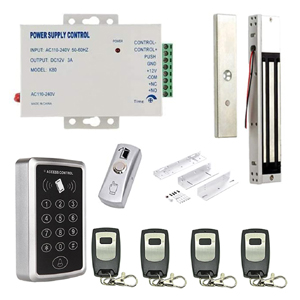
Notes:
- I'd suggest setting up the device on a table and make sure basic functions before installation.
Frequently Asked Question(Read Firstly):
- Lock Force is not enough and need get MAXIMUM Force , reason is: Armature Plate installed too tight; recommend loosen the Armature Plate screws a little so that the plate can swing a little, check from chapter 2 of this link: https://beseencontrol.com/maglock.html
- Use what wire for the connection? Normally use cat-6e 24awg cable is ok for this system wire.
- We have step by step video and diagram for each component wire.
- We bring value to a lot projects during the past 20 years, also save a lot cost for many customers. If any problem, please don't return directly, that will bring big loss to me. I do support with my heart, Contact me for solution.
- Lock Force is not enough and need get MAXIMUM Force , reason is: Armature Plate installed too tight; recommend loosen the Armature Plate screws a little so that the plate can swing a little, check from chapter 2 of this link: https://beseencontrol.com/maglock.html
- Use what wire for the connection? Normally use cat-6e 24awg cable is ok for this system wire.
- We have step by step video and diagram for each component wire.
- We bring value to a lot projects during the past 20 years, also save a lot cost for many customers. If any problem, please don't return directly, that will bring big loss to me. I do support with my heart, Contact me for solution.
How To Support you
Will support you for ever, check Support method(Email us or Skype) from: HERE
- If you have any questions or concerns, please refrain from returning our products directly, as we need to sell 4 or 5 kits to catch the loss back....
- Any question is good question, Any requirement is good requirement, just contact us freely.
- Can provide/exchange new components freely(lock/controller/Power Unit/Exit button.etc.),just tell us freely.
Video and Materials Link:
1. For how to wire the Lock, Keypad and Exit Button, please check below wire video:
https://vimeo.com/1065723733/eeb49e7ba5
The Remote Receiver is already built inside power supply unit, and we did code pair before the shipping. So just follow above, power on and can use directly, VERY EASY.
2. Keypad Program video and manual:
https://vimeo.com/917020352/c5a83e28fe
Manual: https://beseencontrol.com/xcp/T-Keypad-Program.pdf
3. If you have new remote, need to sync code,please follow below video:
https://vimeo.com/891767668/81c9204bb6
4. If press the remote, the lock is not open, need to check:
- Do you stand too far away from the power supply unit? the remote receiver module is built in power unit, so suggest installing the power unit near to the door/lock.
- If need to sync code, sync code, easy and quick, follow below video:
https://vimeo.com/891767668/81c9204bb6
- Technical support, Send email to: be.seen@hotmail.com
5. (Optional Check )Also we have Complete Wire diagram from:
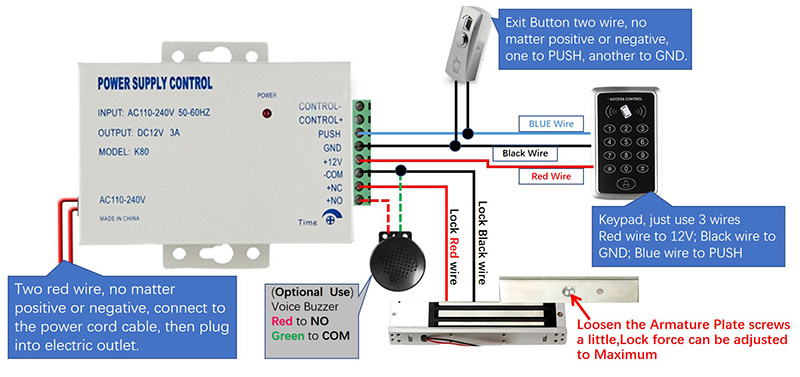
Lock Install:
1. For how to adjust lock force or make it engaged, follow this video:
https://vimeo.com/924925386/e43cd220a7
2. Check the Magnetic lock install video and How to Get Maximum Force from:
https://vimeo.com/860872336/55c0f7aec0
and
https://vimeo.com/860872421/c34194b720
Frequent Asked Qustion:
For example, Lock force is not good, answers from Here
If door open time too short, follow below guide:
https://beseencontrol.com/Adjust-Open-Time-V2.jpg
I will support you for ever with my nearly 20 years experience.
1. If you prefer email, I will do email support.
2. If you want phone support, I can call you( Please tell me your phone number)
3. Also can do teamviewer support to remotely connect to your computer to guide you, to provide live training and support for you.