Strike Lock Instruction for your Control System
1.How To Support you:
- Will support you for ever, check Support method(Email us or Skype) from: HERE
- Below Chapter 8 is detail trouble shooting guide, also send me email freely for any question.
Frequently Asked Question(Read Firstly):
- Use what wire for the connection? Normally use cat-6e 24awg cable is ok for this system wire.
- We have step by step video and diagram for each component wire,focus on one door firstly. For the software, we have video gudie, we also have detail software manual, check below chapter 3.
- We bring value to a lot projects during the past 20 years, also save a lot cost for many customers. If any problem, please don't return directly, that will bring big loss to me. I do support with my heart, Contact me for solution.
- Below Chapter 8 is for trouble shooting guide, very helpful.
Mainly below Topics:
- Hardware Wire and Install(Put all on desktop and Begin from one door firstly).(Need Check)
- Software programmming. (Need Check)
- Backup system after all official programmed. (Need Check)
- Some customer don't want to watch video, Can directly check manual and Big Pictue Diagram from HERE.(Optional Check).
- Don't want to Install/Use the Application software, just use the Simple Web Interface, Check from Here.(Optional Check).
- Advanced Control features check from here.(Optional Check).
- Quick Trouble shooting tips if can't open lock, check from here.(Check this guide if have problem to open lock).
2.Hardware Connection:
Suggestion: I'd suggest setting up the device on a table and make sure basic functions before installation, Begin and focus on one door firstly.
2.1 Video Need Check Firstly: https://youtu.be/SI9_Si9ug-g
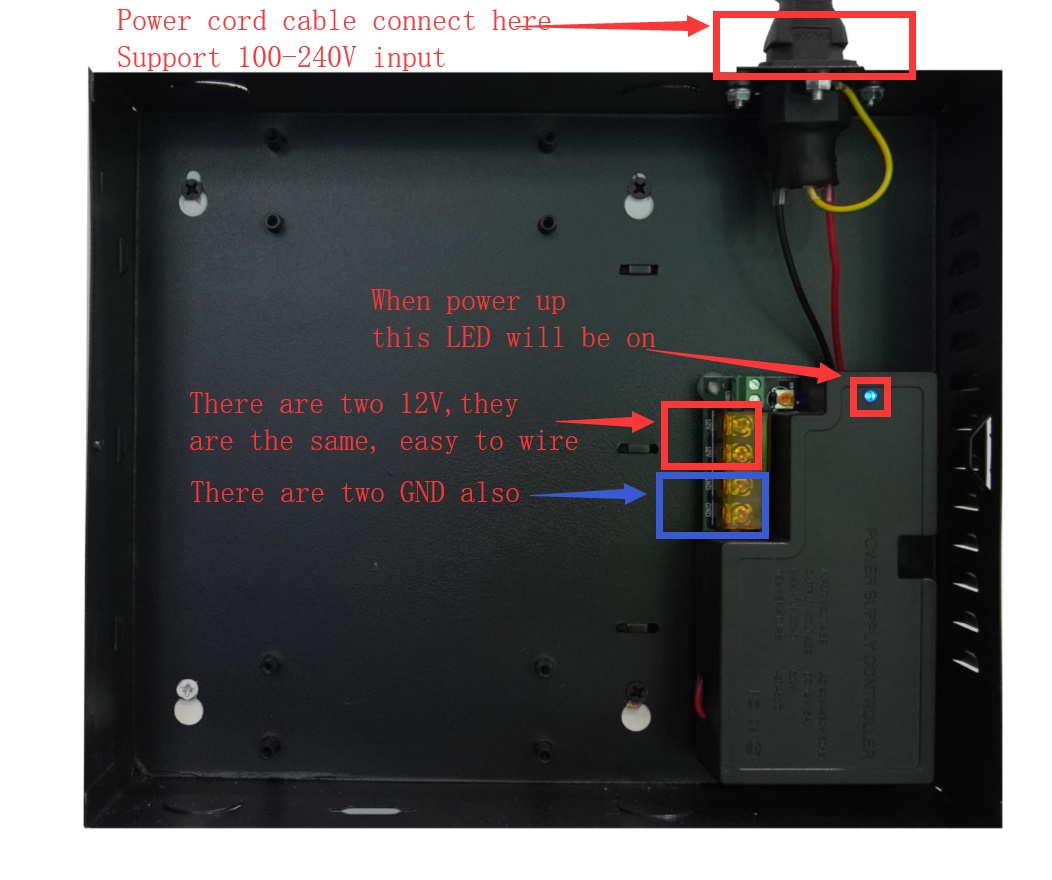
2.2 About Power supply box:
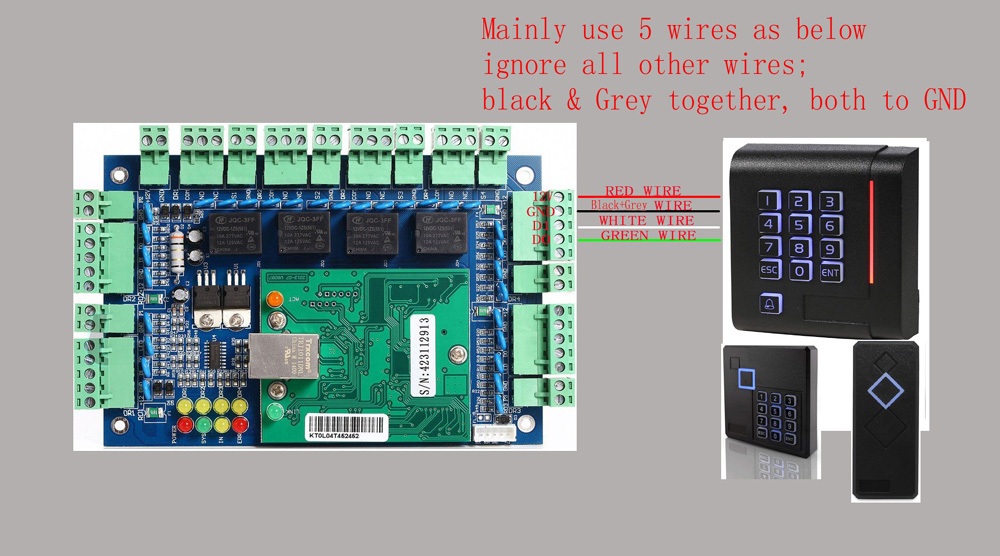
2.3 Control Panel power on and Structure:
2.4 Connect the door reader:
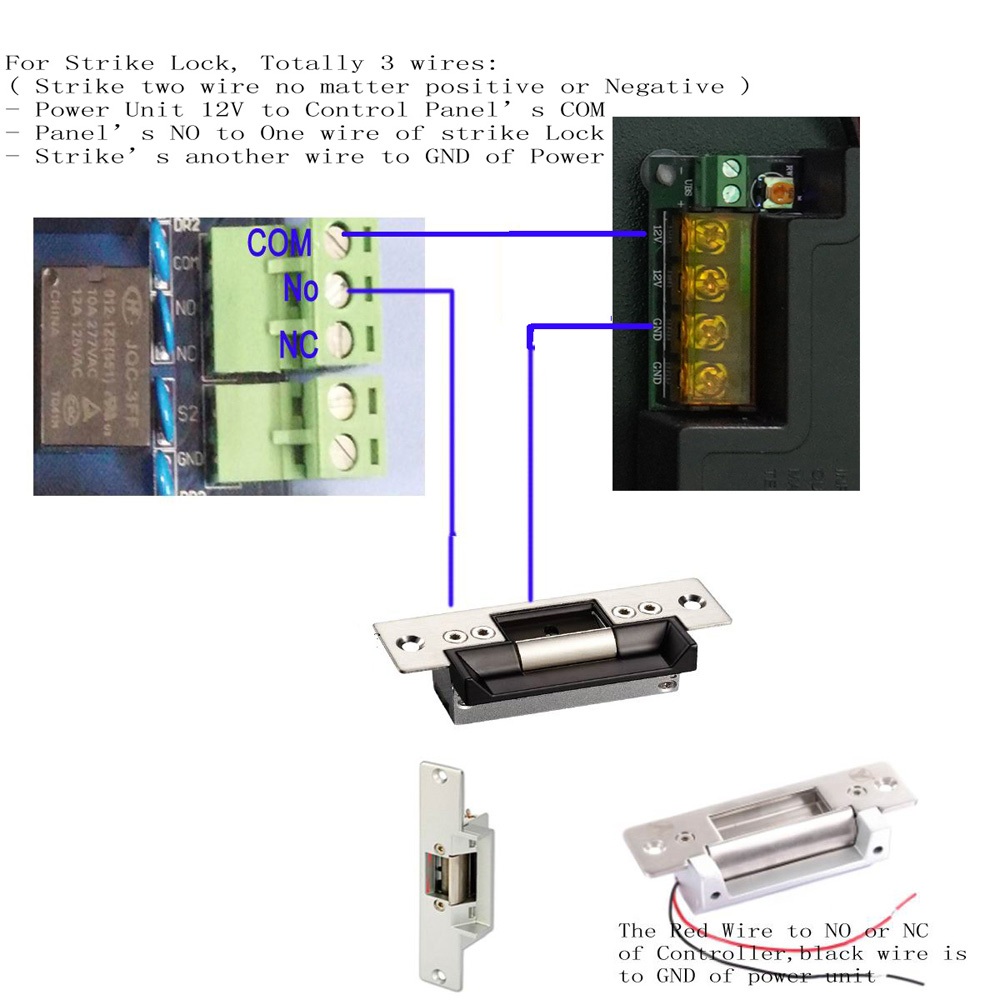
2.5 Connect strike lock:
2.6 Connect the Exit Button/Motion Sensor:
- Check the Wire Picture from HERE.
- If you have Motion Sensor, Wire Picture from HERE and check some tips(adjust sensitivity and angle/detection area)from HERE.
3.Software Programming:
3.1 Software download from below link(Be sure that Software support: win7/win8/win10 both 32 and 64 bit system, run the related setup file to install. )
https://beseencontrol.com/AccessControl.en.zip
Firstly extract it to a new folder, How to Install software: run related setup file based on your computer Operating System. (setupWin10.exe for Windows10;;; setupWin7.exe for windows7)
Password of software:
account: abc
password: 123
3.2 software video: https://youtu.be/AOJrqVvQl4k
3.3 Software Manual from: https://beseencontrol.com/132/SoftwareManual.zip
3.4. Phone app to open door: https://beseencontrol.com/phoneapp.html
4.Backup Your System:
In case that you replace computer or computer is corrupted, It's Higly recommended to do a backup after all programming job done, guide from Here.
5.Check Wire diagram Big Picture and Manual Directly
5.1 Wire connection big picture from below link( for 1/2/4 door Control Panel):
https://beseencontrol.com/Wire-Big-Picture.zip
5.2 Software Manual from: https://beseencontrol.com/132/SoftwareManual.zip
6.Web interface
Check from HERE.
7.Advanced Control Features.
If you want to implement such as below features, please send email to us so that we can provide detail guide and video.
- Check the detail History Entry Record.
- Allow for access for certain door at certain time for different users.
- Keep door auto open during business time.
- Keypad PIN code programming(need to use keypad reader).
- Your own Fire alarm system trigger door auto open in emergency.
- Swipe certain times to open and swipe certain times to Close.
- First card Open.
- a lot other features ....
8.Useful Trouble shooting tips if can't Open Lock.
Please check from HERE.
I will support you for ever with my over 20 years experience.
1. If you prefer email, I will do email support.
2. If you want phone support, I can call you( Please tell me your phone number)
3. Also can do teamviewer support to remotely connect to your computer to guide you, to provide live training and support for you.