Will support you for ever, check Support method from: HERE
1. Basic Operation Steps(Quick Guide):
2. Video Guide:
2.1) For Location Check Point register process, video is below:
https://www.youtube.com/watch?v=jNYLJRLuycM&feature=youtu.be
https://www.youtube.com/watch?v=X2mmiltjY7k&feature=youtu.be
2.3) For the software video, check from below video link:
Part 1: https://youtu.be/x_6LtzsSInQ
Part 2: https://youtu.be/Kr-ikLIWMqk
3. Download Software and USB Driver .etc:
https://beseencontrol.com/hpatrol/T.Software And Manuals.zip
4. Main Steps:
4.1) Install the software and USB driver(for how to download, check below chapters), if your computer is 64 bit system, please install:CH341SER.EXE which is under folder of "1.USB Driver(Firstly Install)\Driver-64BitSystem"
Tips: Some computer will automatically install the driver, so even have driver install failure message, you can still download data, please continue to collect data in the software.
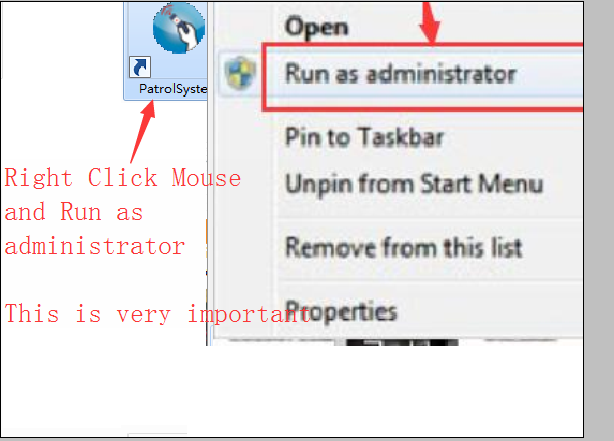
4.2) When run the software, please run as administrator. Check below picture:
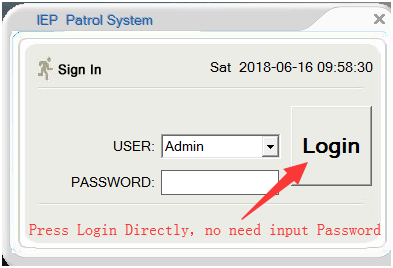
4.3) When the software start, as below, press "Login" Directly.
I will support you for ever with my nearly 20 years experience.
1. If you prefer email, I will do email support.
2. If you want phone support, I can call you( Please tell me your phone number)
3. Also can do teamviewer support to remotely connect to your computer to guide you, to provide live training and support for you.