Will support you for ever, check Support method(Email us or Skype) from: HERE
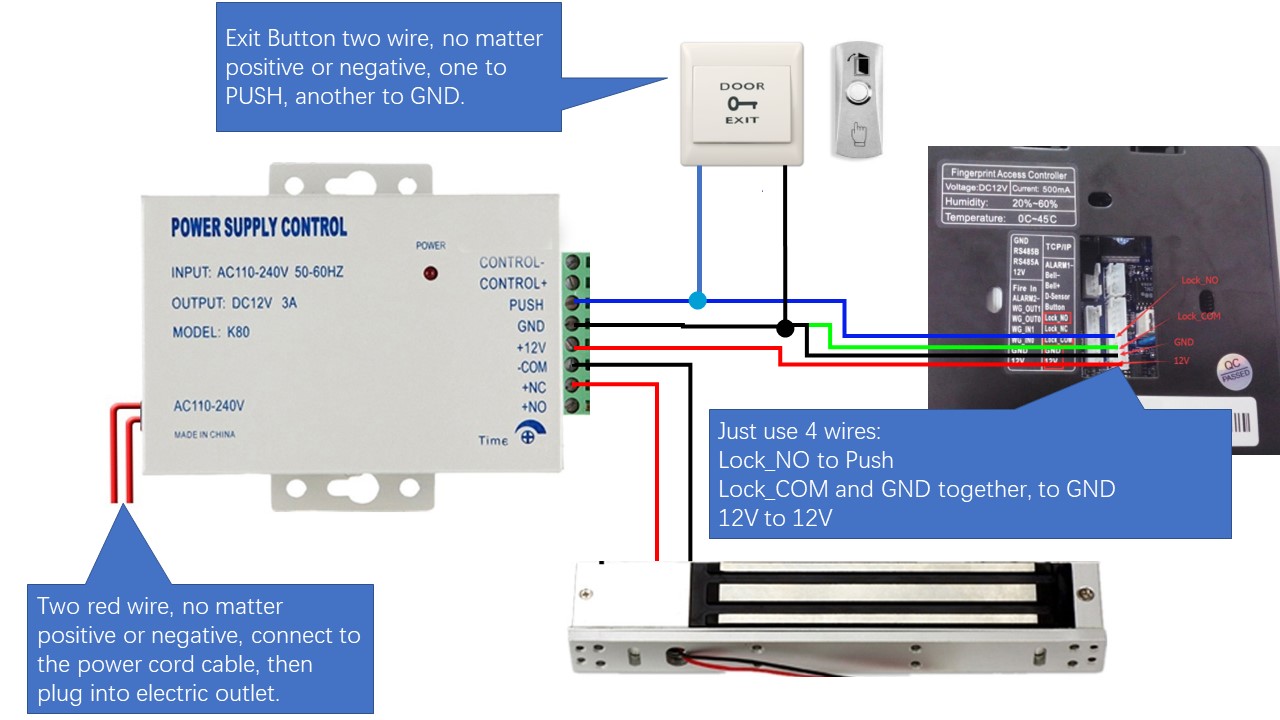
1.1. For how to wire the system, please check below video:
https://vimeo.com/707850245/b65c24db32
1.2. Basic Enroll/program video:
https://vimeo.com/803368320/612910b3e9
1.3. For the wire diagram, check from HERE.
1.4. If have Motion Detector/Exit Motion Sensor, check the wire by click HERE.
1.5. If have Door Bell, check the wire by click HERE.
1.6. If have multiple fingerprint devices, just enroll one time on one device, copy to other device by this GUIDE, Click HERE.
2. Lock Install:
2.1. Check the Magnetic lock install video and How to Get Maximum Force from Here.
2.2. Check the Strike Lock Install and DEMO from HERE1 and HERE2.
3. Trouble Shooting:
Finger verification passed, but lock is not open. [Answer]: for the two wires, it's green and black wires together, then to GND of power unit. It's NOT Purple wire+black wire together.
I will support you for ever with my nearly 20 years experience.
1. If you prefer email, I will do email support.
2. If you want phone support, I can call you( Please tell me your phone number or WhatsAPP number for video call)
3. Also can do teamviewer support to remotely connect to your computer to guide you, to provide live training and support for you.